

ClickUp Roll-Ups: Supercharge Your Workflow with Smart, Connected Data
🧠 What Are Roll-Up Fields in ClickUp?
ClickUp Roll-Up Fields are an extension of the Relationship field—and they completely change the game for managing cross-linked data.
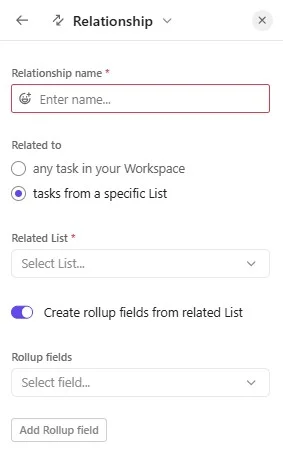
While Relationships allow you to link tasks or lists (like a “Client” task to a “Deal” task), Roll-Ups let you pull fields from that linked task into the current one, right into your list or task view. These can be fields like:
- Status
- Time Tracked
- Deal Value
- Lead Source
- Custom Fields (like “Service Package” or “Location”)
And with ClickUp 3.0, this is no longer limited to List view—you can now see and add Roll-Ups inside the task view itself.
🚀 Why It’s Innovative
✅ Auto-Populated Data Without Duplication
Let’s say you’re managing leads, and you’ve got:
- A Leads list where each task is a lead
- A Contacts list where each task is a client profile with fields like Email, Phone, Account Manager, and Tier
Previously, if you wanted this data across both lists, you had to manually copy/paste—or rely on automations.
Now? Simply link the Lead to the Contact using a Relationship field. Then use Roll-Ups to automatically populate the Email, Phone, and Tier fields in the Lead task—without manual entry or duplication. It’s like having a live, synced CRM inside ClickUp.
🔄 Always Synced, Always Up to Date
When the source field changes (e.g. contact updates their phone number), all linked roll-ups instantly reflect the new value. Zero chance of outdated info hiding in some corner of your workspace.
📘 Real-World Example: Lead Management System
Scenario:
You’re a freelance consultant managing leads across multiple campaigns:
- You have a Master Leads list
- You run campaign-specific lists like “Website Outreach”, “Instagram Inquiries”, “Referral Leads”
Each campaign list has its own tasks, but they often relate to the same person or company.
How Roll-Ups Help:
- You link all campaign-specific leads to the master contact in “Master Leads” using the Relationship field.
- You roll up Email, Lead Source, Deal Stage, and Owner from the master contact into each campaign-specific lead.
- Every campaign task shows the same live data without duplication.
✅ One truth.
✅ Real-time.
✅ Saves hours.
🔍 Other Smart Use Cases
1. Client Management for Agencies
Track projects across lists (“Web Design”, “Branding”, “SEO”) and roll-up key fields like client email, retainer status, or billing frequency from a single “Client” record.
2. Nonprofits Managing Donors
Link donation records to donor profiles. Roll-up the donation total, preferred channel (email/social), and last contacted date—making reports and engagement a breeze.
3. Course or Event Management
Link sessions or lessons to instructors. Roll-up instructor name, topic, or bio from a master “Instructors” list—saving setup time across events.
4. Influencer Tracking
If you’re running local influencer campaigns (which RareBetter supports), roll-up reach, niche, email, and engagement rate from your influencer database into every campaign they’re tagged in.
🛠️ How to Use Roll-Ups in 3 Steps
- Create a Relationship: Link a task to another task or list.
- Add a Roll-Up Field: In either List view or Task view, add a new column inside the relationship panel. Choose the field to roll up (e.g. Email, Custom Field).
- Select a Calculation (if applicable): You can sum, average, or just show single/multiple values.
📊 Summary Table
| Feature | Description |
|---|---|
| 🔗 Relationship Extension | Pull custom fields from linked tasks |
| 🔄 Auto-Sync | Live updates whenever the source field changes |
| 🧩 Cross-List Integration | Manage leads, clients, and influencers across lists |
| 👀 View Anywhere | Add roll-up fields in both List and Task views |
| ⚠️ Known Limitations | No grouping/filtering by roll-up field yet (in roadmap) |
Get in touch
👉 Ready to eliminate copy-paste chaos and build a cleaner, smarter ClickUp system?
Contact RareBetter today for ClickUp implementation, automation, and onboarding support.
Contact via WhatsApp
